OAuth 2.0 Login with Embedded Wallets
OAuth 2.0 is a widely adopted standard that enables users to authenticate with third-party identity providers in a secure and user-friendly manner. Web3Auth offers native support for multiple OAuth 2.0 login options, allowing developers to integrate familiar authentication experiences directly into their applications.
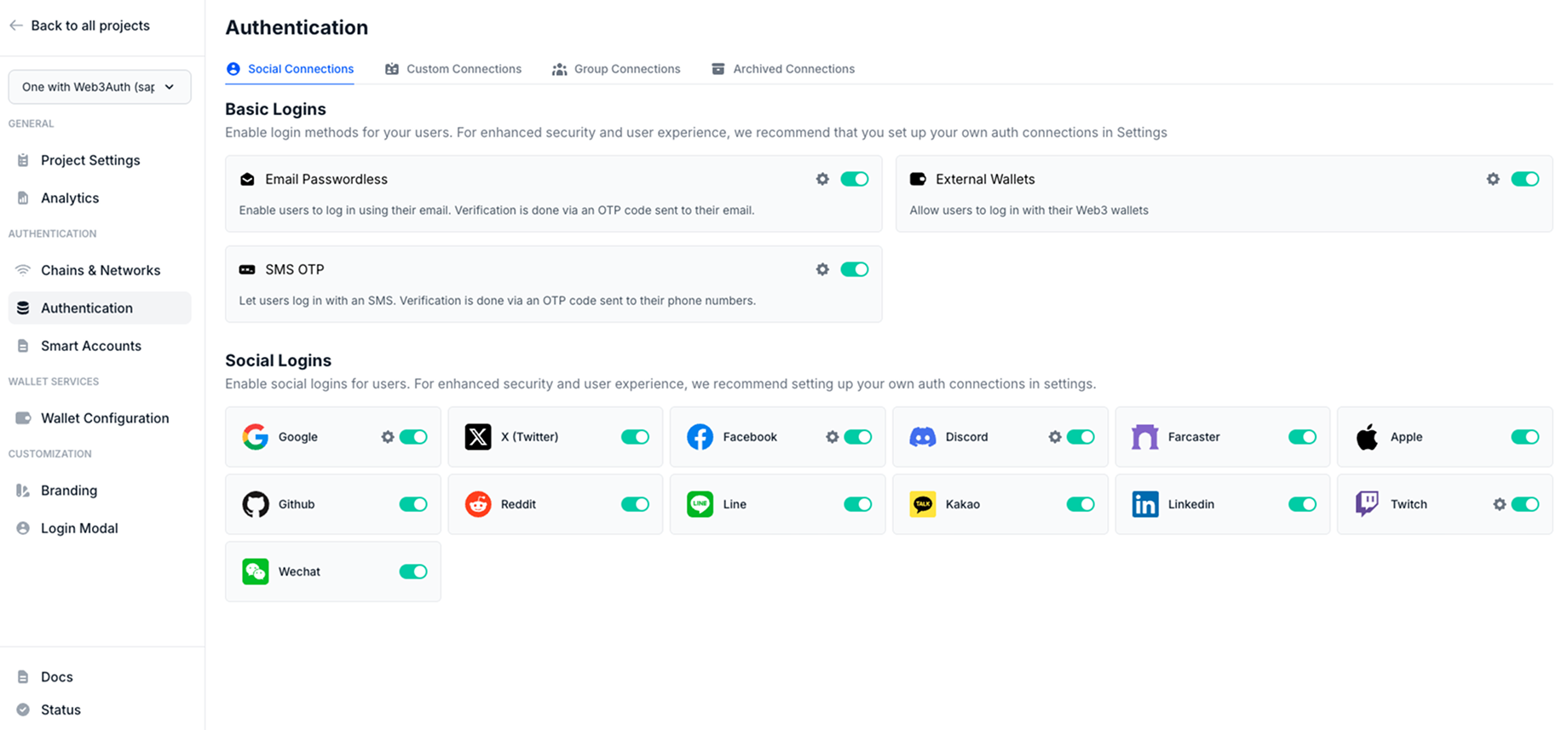
To use this feature, enable X (Twitter), Farcaster, Apple, GitHub, Reddit, Line, Kakao, LinkedIn, or WeChat from the Social Connections section in the dashboard.
By default, Web3Auth uses its own pre-configured credentials for different social login providers.
Usage
Follow our quickstart to set up the basic flow.
Log in with X
Ensure that you enable X (Twitter) on the dashboard.
import { useWeb3AuthConnect } from '@web3auth/modal/react'
import { WALLET_CONNECTORS, AUTH_CONNECTION } from '@web3auth/modal'

function CustomConnectors() {
  const { connectTo, loading, isConnected, error } = useWeb3AuthConnect()

  const loginWithX = async () => {
    await connectTo(WALLET_CONNECTORS.AUTH, {
      authConnection: AUTH_CONNECTION.TWITTER,
    })
  }

  return (
    <div>
      <button onClick={loginWithX} disabled={loading || isConnected}>
        Login with X
      </button>
      {error && <div>{error.message}</div>}
    </div>
  )
}
Log in with Farcaster
Ensure that you enable Farcaster on the dashboard.
import { useWeb3AuthConnect } from '@web3auth/modal/react'
import { WALLET_CONNECTORS, AUTH_CONNECTION } from '@web3auth/modal'

function CustomConnectors() {
  const { connectTo, loading, isConnected, error } = useWeb3AuthConnect()

  const loginWithFarcaster = async () => {
    await connectTo(WALLET_CONNECTORS.AUTH, {
      authConnection: AUTH_CONNECTION.FARCASTER,
    })
  }

  return (
    <div>
      <button onClick={loginWithFarcaster} disabled={loading || isConnected}>
        Login with Farcaster
      </button>
      {error && <div>{error.message}</div>}
    </div>
  )
}
Log in with Apple
Ensure that you enable Apple on the dashboard.
import { useWeb3AuthConnect } from '@web3auth/modal/react'
import { WALLET_CONNECTORS, AUTH_CONNECTION } from '@web3auth/modal'

function CustomConnectors() {
  const { connectTo, loading, isConnected, error } = useWeb3AuthConnect()

  const loginWithApple = async () => {
    await connectTo(WALLET_CONNECTORS.AUTH, {
      authConnection: AUTH_CONNECTION.APPLE,
    })
  }

  return (
    <div>
      <button onClick={loginWithApple} disabled={loading || isConnected}>
        Login with Apple
      </button>
      {error && <div>{error.message}</div>}
    </div>
  )
}
Log in with GitHub
Ensure that you enable GitHub on the dashboard.
import { useWeb3AuthConnect } from '@web3auth/modal/react'
import { WALLET_CONNECTORS, AUTH_CONNECTION } from '@web3auth/modal'

function CustomConnectors() {
  const { connectTo, loading, isConnected, error } = useWeb3AuthConnect()

  const loginWithGitHub = async () => {
    await connectTo(WALLET_CONNECTORS.AUTH, {
      authConnection: AUTH_CONNECTION.GITHUB,
    })
  }

  return (
    <div>
      <button onClick={loginWithGitHub} disabled={loading || isConnected}>
        Login with GitHub
      </button>
      {error && <div>{error.message}</div>}
    </div>
  )
}
Log in with Reddit
Ensure that you enable Reddit on the dashboard.
import { useWeb3AuthConnect } from '@web3auth/modal/react'
import { WALLET_CONNECTORS, AUTH_CONNECTION } from '@web3auth/modal'

function CustomConnectors() {
  const { connectTo, loading, isConnected, error } = useWeb3AuthConnect()

  const loginWithReddit = async () => {
    await connectTo(WALLET_CONNECTORS.AUTH, {
      authConnection: AUTH_CONNECTION.REDDIT,
    })
  }

  return (
    <div>
      <button onClick={loginWithReddit} disabled={loading || isConnected}>
        Login with Reddit
      </button>
      {error && <div>{error.message}</div>}
    </div>
  )
}
Log in with Line
Ensure that you enable Line on the dashboard.
import { useWeb3AuthConnect } from '@web3auth/modal/react'
import { WALLET_CONNECTORS, AUTH_CONNECTION } from '@web3auth/modal'

function CustomConnectors() {
  const { connectTo, loading, isConnected, error } = useWeb3AuthConnect()

  const loginWithLine = async () => {
    await connectTo(WALLET_CONNECTORS.AUTH, {
      authConnection: AUTH_CONNECTION.LINE,
    })
  }

  return (
    <div>
      <button onClick={loginWithLine} disabled={loading || isConnected}>
        Login with Line
      </button>
      {error && <div>{error.message}</div>}
    </div>
  )
}
Log in with Kakao
Ensure that you enable Kakao on the dashboard.
import { useWeb3AuthConnect } from '@web3auth/modal/react'
import { WALLET_CONNECTORS, AUTH_CONNECTION } from '@web3auth/modal'

function CustomConnectors() {
  const { connectTo, loading, isConnected, error } = useWeb3AuthConnect()

  const loginWithKakao = async () => {
    await connectTo(WALLET_CONNECTORS.AUTH, {
      authConnection: AUTH_CONNECTION.KAKAO,
    })
  }

  return (
    <div>
      <button onClick={loginWithKakao} disabled={loading || isConnected}>
        Login with Kakao
      </button>
      {error && <div>{error.message}</div>}
    </div>
  )
}
Log in with LinkedIn
Ensure that you enable LinkedIn on the dashboard.
import { useWeb3AuthConnect } from '@web3auth/modal/react'
import { WALLET_CONNECTORS, AUTH_CONNECTION } from '@web3auth/modal'

function CustomConnectors() {
  const { connectTo, loading, isConnected, error } = useWeb3AuthConnect()

  const loginWithLinkedIn = async () => {
    await connectTo(WALLET_CONNECTORS.AUTH, {
      authConnection: AUTH_CONNECTION.LINKEDIN,
    })
  }

  return (
    <div>
      <button onClick={loginWithLinkedIn} disabled={loading || isConnected}>
        Login with LinkedIn
      </button>
      {error && <div>{error.message}</div>}
    </div>
  )
}
Log in with WeChat
Ensure that you enable WeChat on the dashboard.
import { useWeb3AuthConnect } from '@web3auth/modal/react'
import { WALLET_CONNECTORS, AUTH_CONNECTION } from '@web3auth/modal'

function CustomConnectors() {
  const { connectTo, loading, isConnected, error } = useWeb3AuthConnect()

  const loginWithWechat = async () => {
    await connectTo(WALLET_CONNECTORS.AUTH, {
      authConnection: AUTH_CONNECTION.WECHAT,
    })
  }

  return (
    <div>
      <button onClick={loginWithWechat} disabled={loading || isConnected}>
        Login with Wechat
      </button>
      {error && <div>{error.message}</div>}
    </div>
  )
}